AI Customer Service Tools: 15 Solutions to Reduce Support Costs (2026)
Cut support costs by 70% with these 15 top-rated AI customer service tools. From chatbots to voice AI—pricing, ROI, and comprehensive implementation guide.

In this article
AI Customer Service Tools: 15 Solutions to Reduce Support Costs (2026)
Last Updated: February 6, 2026
Picture this: It's Black Friday, or your SaaS product just went viral. Your support inbox has 5,000 unread tickets. Your phone lines are jammed. Your team is burned out, and customers are angry-tweeting about "zero support."
In 2025, this was a crisis. In 2026, it's just a Tuesday morning that your AI handles while you drink your coffee.
AI customer service software has graduated from clunky "I didn't understand that" chatbots to sophisticated agents that can resolve 80% of inquiries without human intervention. We're talking about tools that don't just answer FAQs but can process refunds, troubleshoot technical issues, update subscriptions, and even upsell customers—24/7, in 50+ languages, for a fraction of the cost of hiring new agents.
But with hundreds of "AI" tools flooding the market, which ones actually work? Which ones are enterprise-grade security nightmares, and which ones are hidden gems for small businesses?
We tested the top 50 solutions on the market to bring you this definitive list of the 15 best AI customer service tools that will actually move the needle on your bottom line.
⚡ Quick Navigation: Find Your Solution
- Best Overall Chatbot: Intercom Fin (#1)
- Best for Small Business: Tidio (#7)
- Best for Voice/Phone: Dialpad (#8)
- Best Email Automation: Front (#11)
- Best Enterprise Suite: Salesforce Einstein (#14)
📌Part 1: AI Chatbots & Virtual Agents (Frontline Support)
These tools sit on your website or app and handle the first line of defense, instantly resolving common queries.
1. Intercom Fin – The GPT-4 Customer Service Hero 🏆
Best For: SaaS companies and digital businesses wanting premium, human-like AI support.
Intercom has been a leader in customer messaging for a decade, but their new Fin AI Agent is a game-changer. Built on GPT-4, Fin doesn't operate on rigid decision trees. Instead, it ingests your entire help center (docs, historic conversations, Notion pages) and answers customer questions with startling accuracy and empathy.
Key AI Features:
- Instant Resolution: Resolves ~50% of support questions instantly with no human setup.
- Source Citation: Fin shows customers exactly which help article it used to generate the answer (builds trust).
- Tone Matching: Automatically adjusts from formal to casual based on your brand voice.
- Seamless Handoff: If Fin gets stumped, it passes the full context to a human agent seamlessly.
Pricing:
- Essential: $39/seat/month
- Fin AI: $0.99 per resolved conversation (you only pay when it actually works)
Real ROI Example:
💡Case Study: A fintech app with 100k users implemented Fin. In month 1, Fin resolved 42% of tickets. Support volume dropped by 2,000 tickets/month, saving roughly $12,000/month in hiring costs.
Quick Verdict: Expensive, but the "pay per resolution" model makes it risk-free to try. It sets the standard for quality. Try Intercom Fin Free
2. Zendesk AI – The Omnichannel Giant 🦍
Best For: Mid-to-large enterprises managing tickets across email, chat, phone, and social.
Zendesk isn't just a help desk anymore; it's an AI powerhouse. Their "Advanced AI" add-on works behind the scenes to triage tickets, suggest answers to human agents, and detect customer sentiment before a human even opens the ticket.
Key AI Features:
- Intelligent Triage: AI reads incoming tickets, tags them (e.g., "Billing Issue," "Urgent"), and routes them to the right specialist.
- Sentiment Analysis: Flags "High Frustration" tickets to VIP support queues.
- Agent Copilot: Suggests full responses to agents, allowing them to reply with one click (review + send).
- Macro Suggestions: Identifies gaps in your knowledge base where you need new articles.
Pricing:
- Suite Team: $19/agent/month
- Advanced AI Add-on: +$50/agent/month (requires higher tier plans)
Pros & Cons: ✅ Integrates with EVERYTHING (1,200+ apps) ✅ proven security/compliance for enterprise ❌ Setup is complex; requires a dedicated admin ❌ "Advanced AI" features get expensive quickly
Quick Verdict: The safe, robust choice for scaling teams. If you process 5,000+ tickets/month, you need this foundation. Get Zendesk Demo
3. Drift Conversational AI – The Sales-Support Hybrid 💰
Best For: B2B companies where "support" often turns into "sales" (e.g., pricing questions).
Drift started as a marketing tool but evolved into a killer support asset. Its unique angle: Intent Recognition. It knows if a user asking "how do I add a user?" is a frustrated admin (Support) or a prospect testing the tool (Sales), and handles them differently.
Key AI Features:
- B2B Intent Library: Pre-trained on millions of B2B conversations to understand business context.
- Account-Based routing: Recognizes VIP clients by IP/login and skips the bot to ring a dedicated account manager.
- Deflection Reporting: clearly shows which help docs are saving you the most money.
Pricing:
- Premium: ~$2,500/month (Starts high, meant for serious B2B teams)
- Enterprise: Custom
Real ROI Example:
💡Case Study: A software compliance firm used Drift to deflect 30% of support chats while simultaneously increasing demo bookings by 15% from the same chat widget.
Quick Verdict: Too pricey for small biz, but for high-ticket B2B sales organizations, it pays for itself in one deal. See Drift Pricing
4. Ada – The "No-Code" Automation Builder 🤖
Best For: Non-technical teams who want to build complex support flows without engineering.
Ada is the "Lego set" of AI support. It empowers support managers to build incredibly complex automation flows (e.g., "Check order status in Shopify" -> "If late, issue $10 credit" -> "Email apology") using a visual drag-and-drop builder.
Key AI Features:
- Actionable AI: Can actually do things (update database, process refund, reset password) via API integrations, not just talk.
- Predictive Suggestions: Guesses what the user wants before they finish typing.
- 100+ Language Support: Instant translation for global brands.
Pricing:
- Quote-based: Generally starts around $60k/year range for mid-market.
Quick Verdict: The most powerful automation tool (vs. just conversation). If you want customers to self-serve complex tasks, choose Ada. Watch Ada Demo
5. Freshdesk (Freshworks Freddy AI) – Budget-Friendly Intelligence 📉
Best For: SMBs and startups adding their first serious help desk.
Freshdesk has always been the "easier, cheaper Zendesk," and their Freddy AI follows suit. It offers 80% of the enterprise power at 30% of the cost. It’s particularly good at "Thank You Detection" (stopping tickets from reopening just because a user said "Thanks") and basic canned response suggestions.
Key AI Features:
- Freddy Copilot: Helps agents rephrase responses to be more empathetic or professional.
- Ticket Field Suggester: Auto-fills category, priority, and group properties.
- Solution Article Generator: Turns a ticket reply into a help desk article in one click.
Pricing:
- Free Plan: up to 10 agents (basic)
- Pro: $49/agent/month (includes basic AI)
- Enterprise: $79/agent/month
Real ROI Example:
💡Case Study: An e-commerce store with 5 agents reduced "Average Handling Time" (AHT) by 25% using Freddy's auto-suggested responses.
Quick Verdict: The best value-for-money entry point. You can set it up in an afternoon. Start Freshdesk Free
6. Help Scout (Beacon AI) – The Human-Centric Choice 🤝
Best For: Teams that prioritize "personal touch" over "deflection rates."
Help Scout is renowned for its "invisible" help desk that feels like a personal email to the customer. Their new AI features respect this philosophy. Instead of a robotic gatekeeper, their Beacon AI helps customers find answers themselves, and helps agents write warmer responses faster.
Key AI Features:
- AI Summarization: Condenses a 50-email thread into a 3-bullet summary for agents taking over a ticket.
- Draft Assist: Expands brief notes ("refund approved, sorry for delay") into a polished, empathetic email.
- Docs Search: A widget that suggests help articles inside your product based on the user's current page.
Pricing:
- Standard: $20/user/month
- Plus: $40/user/month (AI features included in Plus)
Quick Verdict: If you hate "ticket numbers" and robotic responses, this is your tool. It uses AI to enhance human connection, not replace it. Try Help Scout
7. Tidio (Lyro) – The Small Business Favorite 🚀
Best For: E-commerce stores and small service businesses needing 24/7 support.
Tidio is built for the little guy. Its new Lyro AI chatbot is a revelation: you scan your website URL, and within 3 minutes, it answers customers using only your content (no hallucinations). It automates "Where is my order?" and "Do you ship to Canada?" questions perfectly.
Key AI Features:
- Lyro AI: Safe, hallucination-free answers based strictly on your FAQs.
- Instagram/Facebook Integration: Handles DMs from social media in the same inbox.
- Live Typing Preview: Agents see what customers are typing before they hit send.
Pricing:
- Free: 50 conversations/month (includes basic chatbot)
- Lyro AI Plan: Starts at $39/month for massive automation capacity.
Real ROI Example:
💡Case Study: A boutique jewelry store used Lyro to handle 70% of holiday rush inquiries, saving the owner ~3 hours per night of answering DMs.
Quick Verdict: The best ROI for <$50/month. Essential for Shopify/WooCommerce owners. Get Tidio Free
📌Part 2: Voice & Phone AI (Call Centers)
Phone support is the most expensive channel ($10-15 per call). These tools use AI to make it cheaper and faster.
8. Dialpad AI – The Smartest Business Phone 📞
Best For: Sales and support teams that still rely heavily on phone calls.
Dialpad isn't just a VoIP phone; it records, transcribes, and analyzes every call in real-time. If a customer says "competitor pricing," Dialpad pops up a battle card for the agent during the call.
Key AI Features:
- Real-Time Assist (RTA): Listens to the call and pops up answers (e.g., customer asks about "refund policy," AI shows the policy on agent's screen).
- Live Sentiment Analysis: Manager dashboard turns red if a live call is going south, allowing the manager to "whisper" advice or barge in.
- Auto-Notes: Summarizes the call and creates a CRM entry automatically.
Pricing:
- Standard: $15/user/month
- Pro: $25/user/month (AI features included)
Quick Verdict: If your team spends >2 hours/day on the phone, this tool is mandatory. The transcription alone saves hours of note-taking. Try Dialpad
9. Aircall AI – The Call Center Powerhouse 🎧
Best For: High-volume call centers integrated with HubSpot/Salesforce.
Aircall focuses on integration. Its AI add-on allows support managers to review 1 hour of calls in 5 minutes by highlighting "key moments." It connects seamlessly with your CRM so agents never have to ask "What's your last name again?"
Key AI Features:
- Call Transcription: Searchable text for every call.
- Topic Extraction: Automatically tags calls by issue (e.g., "Shipping Delay," "Broken Product").
- Insight Cards: Shows customer history and "churn risk" score before the agent picks up.
Pricing:
- Essentials: $30/user/month
- Professional: $50/user/month (includes advanced integrations)
Quick Verdict: The most "plug-and-play" call center solution for modern tech stacks. Get Aircall Demo
📌Part 3: Email & Ticket Automation
Sometimes you don't need a chatbot; you just need to clear the email backlog.
10. Helpwise – The Shared Inbox Hero 📧
Best For: Teams sharing support@company.com or sales@company.com.
Helpwise turns a chaotic Gmail inbox into a collaborative workspace. Its AI drafts replies based on similar past tickets and prevents two agents from replying to the same email.
Key AI Features:
- Email Autocomplete: Finishes your sentences based on past replies.
- Collision Detection: "John is replying to this..." alert.
- Rules Engine: "If email contains 'invoice', assign to Finance team."
Pricing:
- Standard: $12/user/month
- Premium: $20/user/month
Quick Verdict: The perfect upgrade from Gmail/Outlook. Cheap, simple, effective. Try Helpwise
11. Front AI – The Collaborative Success Platform 👥
Best For: Innovative teams who want to treat emails like tasks.
Front looks like an email client but acts like a project management tool. Its Magic Compose AI (built in partnership with OpenAI) allows agents to draft replies based on bullet points or summarize long strings of emails instantly.
Key AI Features:
- Magic Compose: "Draft a polite decline" → AI writes the full email.
- Tagging Automation: Scans email body for keywords like "bug" or "urgent" and tags accordingly.
- Macro Suggestions: Suggests the right canned response based on context.
Pricing:
- Starter: $19/seat/month
- Growth: $59/seat/month
- Scale: $99/seat/month
Quick Verdict: The best UI in the game. If your team lives in email, this makes them 2x faster. Get Front Demo
📌Part 4: Knowledge Base & Enterprise Tools
Automate the answers people search for, or scale to thousands of agents.
12. Guru – The Enterprise Brain 🧠
Best For: Internal support teams (IT/HR) or customer support teams needing "one source of truth."
Guru isn't just a chatbot; it's an AI layer that sits on top of all your apps (Slack, Google Drive, Salesforce). It answers questions like "What’s our refund policy?" by searching everywhere and citing sources.
Key AI Features:
- Answers: Ask a question in Slack, Guru finds the answer from your Google Docs or Notion.
- Assist: Suggests knowledge cards to agents while they are chatting with customers.
- Verification: AI flags content that hasn't been updated in 3 months.
Pricing:
- All-in-one: $10/user/month
- Enterprise: $20/user/month
Quick Verdict: Essential for keeping your team on the same page. No more giving customers outdated info. Try Guru Free
13. Document360 (Eddy AI) – The Self-Service Specialist 📖
Best For: Creating beautiful public help centers.
If you want a detailed knowledge base (like Stripe's docs), this is the tool. Eddy AI is their assistive search that acts like a mini-ChatGPT on your documentation site.
Key AI Features:
- Eddy AI Search: Users politely ask questions, and it summarizes the answer from 5 different help articles.
- Article Writer: AI generates FAQs from support ticket clusters.
- SEO Optimization: Suggests meta descriptions for your help articles.
Pricing:
- Standard: $149/project/month
- Professional: $299/project/month
Quick Verdict: The best dedicated knowledge base software. Great for SaaS documentation. View Document360
14. Salesforce Service Cloud (Einstein) – The Enterprise Standard 🏙️
Best For: Large enterprises (50+ agents) that already use Salesforce CRM.
You know Salesforce. It's big, it's powerful, and it runs the world's biggest support teams. Einstein GPT brings generative AI into the mix, drafting emails, summarizing cases, and generating knowledge articles.
Key AI Features:
- Einstein GPT: Generates personalized chat/email replies using CRM data (e.g., "Hi John, I see you bought the X200 last week...").
- Work Summaries: Auto-summarizes a 20-minute call into a paragraph for the case file.
- Next Best Action: Tells the agent exactly what to do next (e.g., "Offer 10% discount").
Pricing:
- Professional: $75/user/month
- Enterprise: $150/user/month
- Einstein Add-on: Extra cost ($50/user/month typically)
Quick Verdict: Overkill for small biz, but unbeatable for massive scale. Explore Salesforce
15. IBM watsonx Assistant – The Enterprise Architect 🏛️
Best For: Fortune 500 companies needing banking-grade security and customizability.
Watson is one of the OGs of AI. It's incredibly robust, secure, and accurate. It’s what banks and airlines use to handle millions of interactions securely.
Key AI Features:
- Actionable Skills: Connects to back-end mainframes to process secure transactions (e.g., "Transfer $500").
- Disambiguation: If a user is vague, Watson asks clarifying questions.
- Phone Integration: Powers the voice bots for major airlines.
Pricing:
- Plus: Starts at $140/month
- Enterprise: Custom
Quick Verdict: If you are a bank, insurance firm, or government agency, this is your safest bet. See IBM watsonx
🏆🆚 Comparison Table: Top 15 AI Customer Service Tools
| Tool | Starting Price | Best For | AI Model | Free Trial? |
|---|---|---|---|---|
| 1. Intercom | $39/mo | SaaS / Startups | GPT-4 | Yes |
| 2. Zendesk | $19/mo | Mid-Market / Enterprise | Proprietary + OpenAI | Yes |
| 3. Drift | ~$2,500/mo | B2B Sales | Conversation Cloud | No |
| 4. Ada | Custom | Automation Heavy | Proprietary | Demo |
| 5. Freshdesk | Free | SMBs on Budget | Freddy AI | Yes |
| 6. Help Scout | $20/mo | Human-Centric Teams | Beacon AI | Yes |
| 7. Tidio | Free | E-commerce | Lyro | Yes |
| 8. Dialpad | $15/mo | Phone Support | Dialpad GPT | Yes |
| 9. Aircall | $30/mo | Call Centers | Aircall AI | Yes |
| 10. Helpwise | $12/mo | Shared Inbox | Helpwise AI | Yes |
| 11. Front | $19/mo | Email Collaboration | Magic Compose | Yes |
| 12. Guru | $10/mo | Internal Knowledge | Enterprise Search | Yes |
| 13. Document360 | $149/mo | Public Knowledge Base | Eddy AI | Yes |
| 14. Salesforce | $75/mo | Enterprise CRM | Einstein GPT | Yes |
| 15. IBM watsonx | Custom | Banking / Gov | Granite | Demo |
📖🎯 Buyer's Guide: How to Choose the Right AI Tool
With 15 options, paralysis is real. Here is a simple framework to pick the winner for your specific business phase.
Phase 1: The "Solopreneur / Small Team" Phase (<5 Agents)
Goal: Stop answering the same 10 emails every day.
- Recommendation: Tidio (#7) or Freshdesk (#5).
- Why: You need a "set it and forget it" chatbot that clears out the "Where is my order?" spam. You don't need complex routing or Salesforce integration.
- Budget: $0 - $50/month.
Phase 2: The "Growth" Phase (5-20 Agents)
Goal: Organization and efficiency. Agents are stepping on each other's toes.
- Recommendation: Intercom (#1) or Front (#11).
- Why: You need assignment rules ("Assign 'Refund' to Sarah"), internal notes, and a chatbot that can handle 30-50% of volume so your team can focus on the hard stuff.
- Budget: $200 - $1,000/month.
Phase 3: The "Scale" Phase (20+ Agents)
Goal: Metrics, SLA compliance, and omnichannel coverage.
- Recommendation: Zendesk (#2) or Salesforce (#14).
- Why: You need reporting (Average Handling Time, CSAT by Agent), strict permissions, and an ecosystem that connects phone, chat, and email into one ticket.
- Budget: $2,000+/month.
🚩 Red Flag Warning: 3 Things to Avoid
- "Fake AI" Wrappers: Avoid tools that claim to be AI but are just rigid "If/Then" decision trees. Real AI (LLM-based) can understand phrasing variations.
- Per-Ticket Pricing: Some tools charge $0.50 per ticket. This punishes you for growing. Look for "per agent" or flat "per resolution" pricing.
- Data Training Requirements: If a tool requires you to manually tag 1,000 historic conversations to "learn," run away. Modern AI (like Intercom Fin or Tidio Lyro) learns from your help docs instantly.
📌📅 30-Day AI Implementation Plan
Don't try to automate everything overnight. Follow this "Land and Expand" strategy:
- Week 1: The Knowledge Audit.
- Update your FAQ page. AI is only as smart as the documents you give it. If your return policy is outdated in your docs, the AI will give outdated answers.
- Week 2: The "Safe Mode" Launch.
- Turn on the AI chatbot but set it to "Draft Mode" (if available) or only show it on non-critical pages (e.g., specific blog posts, not the checkout page).
- Week 3: Human Review.
- Read the last 50 AI conversations. Where did it fail? Update your docs to cover those gaps.
- Week 4: Full Throttle.
- Deploy to the homepage. Set up an escalation rule: "If customer says 'Human' or 'Agent', route to a person immediately."
❓🙋 Frequently Asked Questions (FAQ)
Will AI customer service replace human agents? ▼
No. AI replaces tasks, not jobs. It handles repetitive Tier 1 queries (resetting passwords, checking status), freeing up humans to handle complex Tier 2/3 issues that require empathy and judgment. Most companies use AI to avoid hiring more agents as they grow, rather than firing existing ones.
How accurate are AI customer service chatbots? ▼
Modern LLM-based bots (like Fin or Lyro) have an accuracy rate of 90-95% when properly grounded in a knowledge base. Unlike older bots, they rarely "hallucinate" if you restrict them to answering only from your provided documentation.
What is the average cost of AI customer support software? ▼
For small businesses, expect to pay $30-$50/month for a good AI chatbot (e.g., Tidio). For mid-sized teams, costs average $80-$150/seat/month (e.g., Zendesk, Intercom). Enterprise solutions can cost $5,000+/month.
Does AI support really save money? ▼
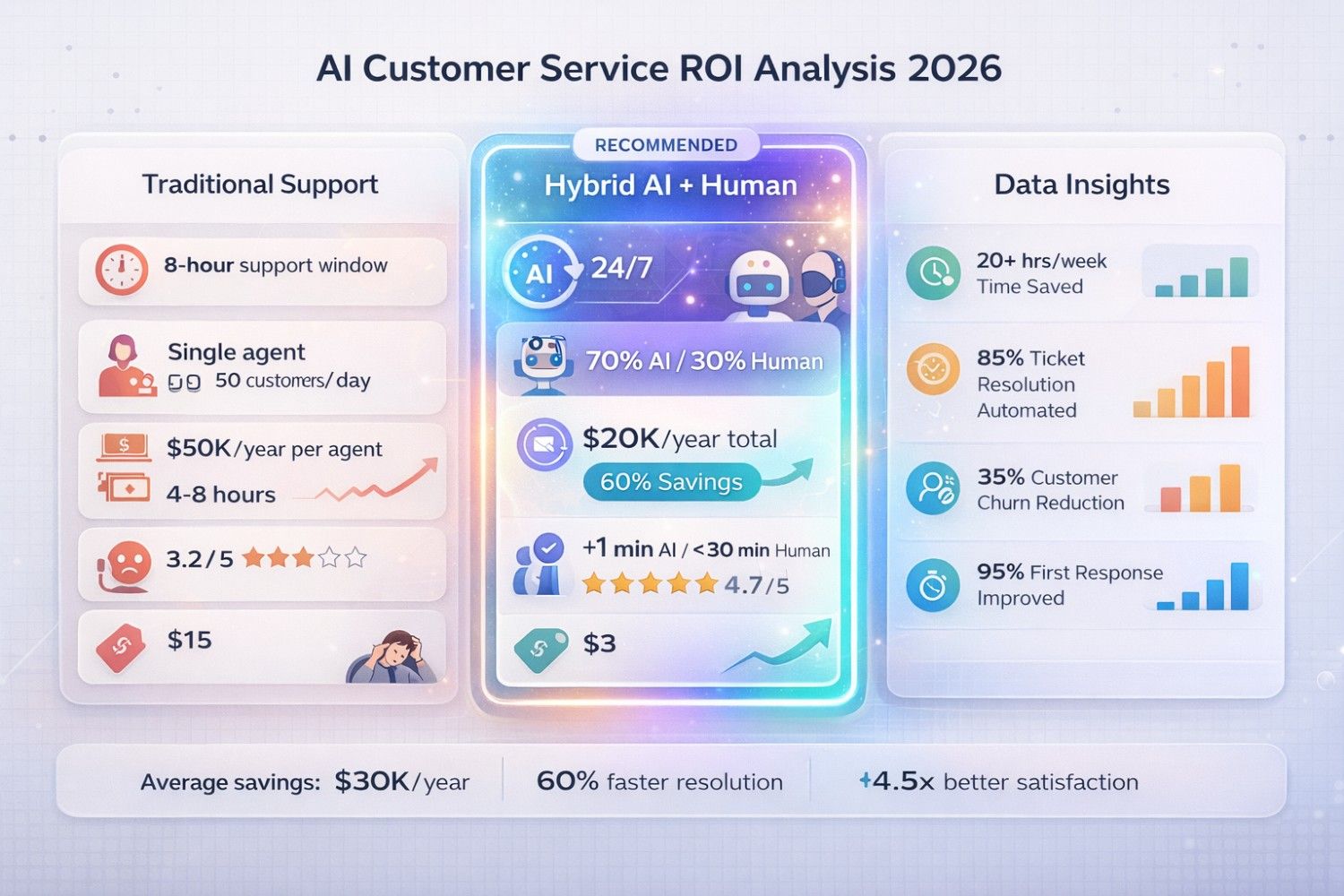
Yes. The average cost of a human-resolved ticket is $8-$15. An AI-resolved ticket costs $0.50-$1.00. If you deflect 1,000 tickets a month with AI, you save roughly $10,000/month immediately.
📌Final Thoughts: The "One Minute" Rule
If a customer question takes a human less than one minute to answer (e.g., "What are your hours?"), a human should never answer it again.
That is the promise of AI in 2026. It's not about robots taking over the world; it's about respecting your support team's time and your customer's patience.
Ready to start?
The future of support isn't Human vs. AI. It's Human + AI vs. the Competition.
Tools Mentioned in This Article
AI Fuel Hub Editorial Team
A collective of AI researchers, engineers, and product experts dedicated to testing and reviewing AI tools. Combined 50+ years of experience in artificial intelligence.